On 5/28/26 17:39, Ilmari Lauhakangas wrote:
On 5/28/26 17:26, drodriguez@libreoffice.org wrote:
Hi there

We have received complaints from users who are experiencing difficulties downloading the language
package from the website, or are unable to download it at all.

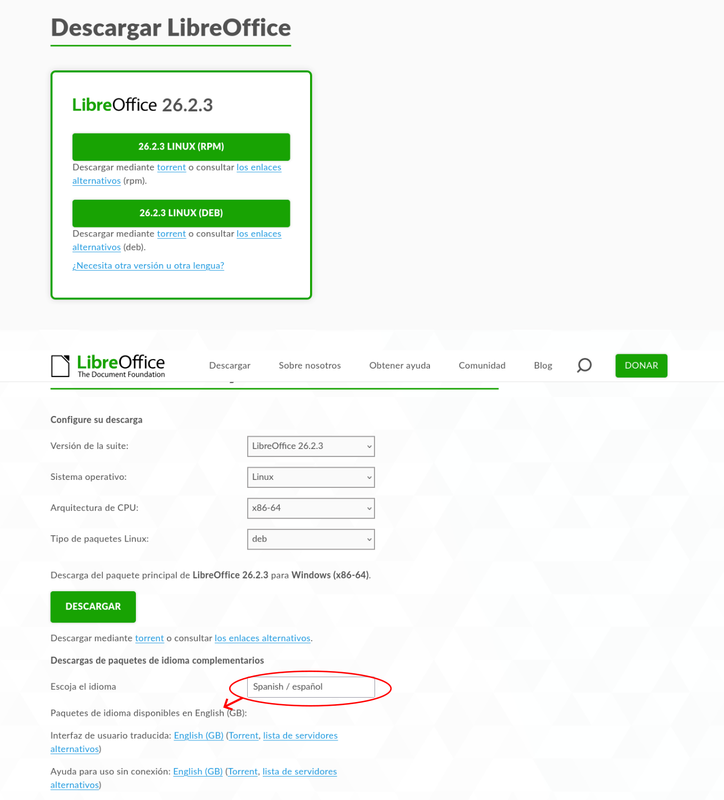
As shown in the screenshot, even when Spanish is selected, the provided link points to the English
language package.

https://i.postimg.cc/26Lfqfqt/snapshot.png

Previously, the language package download was offered openly. Perhaps that would be the best
approach.

It can also be observed that, even when Linux x86_64 DEB is selected, the main package offered
corresponds to the Windows version.
Hi,

does the user have JavaScript disabled in their browser? If yes, the language/help package link
(and the text labels) updating will not work.

My hope is that in the not-too-distant future we can offer only two versions: English and all
languages. This would eliminate the need to use JavaScript. I mean, I could do everything with CSS
right now, but I would need to add like 300 elements which then get their visibility toggled per
the chosen language/version combo.
In the case of no JS, it is strange that we don't see the fallback messages in the screenshot. If
you examine the rendered source of the download page, you see these:

<p class="languages-packs-fallback">
    You seem to have JavaScript disabled in your web browser.
</p>
<p class="languages-packs-fallback">
    You can directly access the language-related packages in <a
href="https://download.documentfoundation.org/libreoffice/stable/";>the file listings</a>.
</p>

When you load a page, it has no-js as a class for the html element. If JS is active, the class is
changed to js. You can test it in your browser by going to dev tools and editing the class to be
no-js - you will see the fallback messages on the page.

Daniel: I need to be in direct contact with the user who sees this.

Ilmari